


CryptoTab Farm: Digital Gold
3.6792.00 Reviews
App Specs
- Version
- 1.3956.0
- Updated On
- License
- Free
- Downloads
- 1,000,000+
- Developer
- CT Systems
- Categories
- Finance
- Platform
- Android
Screenshots
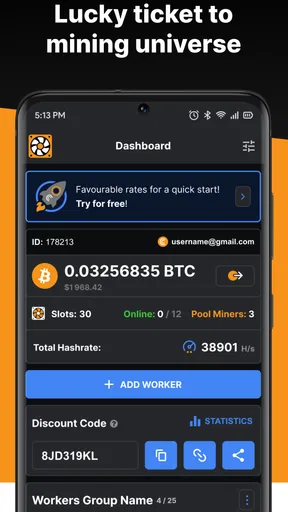
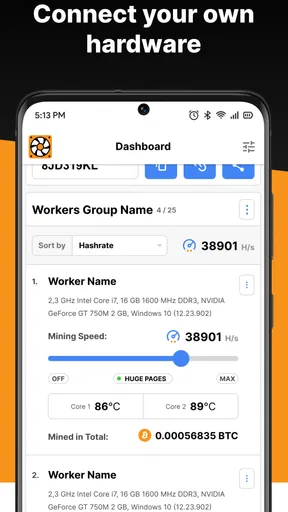
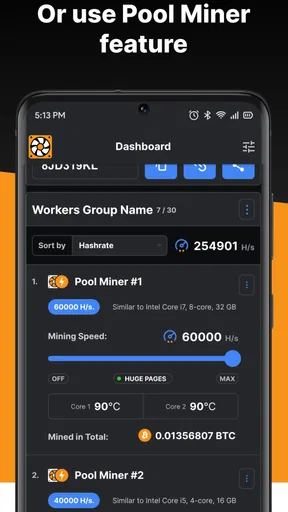
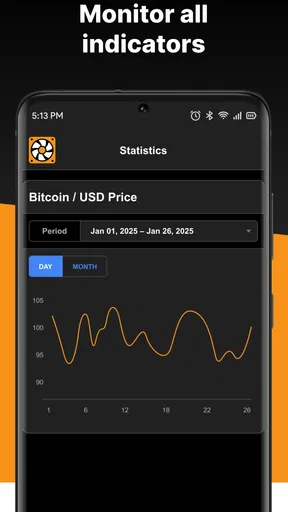
 Analysis by AppCompare
I’d approach CryptoTab Farm as a way to supervise a small mining setup, not as a shortcut to dependable income. The key question is whether you already have devices you can leave running and want to experiment with coordinating them. If you are considering buying hardware or adding a demanding task to a phone you rely on all day, I’d pause and weigh the costs first.
Start with the devices you can spare
The useful starting point is not “How many devices can I connect?” but “Which devices can I afford to keep busy?” An older laptop that spends most of the day plugged in may be a more sensible test than your primary phone, which you need for calls, navigation, and everyday apps. That distinction matters because mining uses processing capacity even when the app is designed to run in the background.
I’d begin with one device, watch how it behaves during ordinary use, and only then decide whether adding another makes sense. Keep an eye on heat, battery drain, responsiveness, and the time the device stays active. Those practical costs can matter more than a dashboard’s upward-moving figures, especially if a phone is involved or the device is shared with someone else.
Follow the workflow, not just the counter
The basic path is straightforward: install the app, set up an account, connect the devices you intend to manage, and use the central dashboard to keep track of them. That makes the app useful as a control point for a small setup rather than a reason to leave every device running automatically. I’d treat each connection as a decision to review, not a one-time setup to forget.
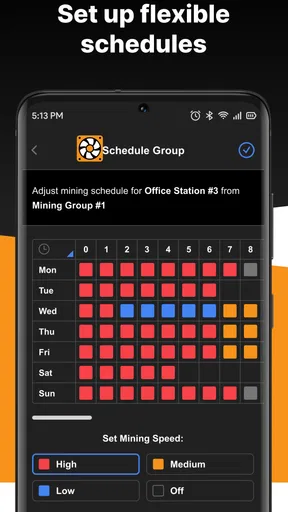
After connecting a device, try a conservative mining-speed setting before increasing it. The point is to see how that particular machine responds under your normal conditions. A laptop used for video calls or a phone you carry around may behave differently from a spare computer sitting at home. Checking one variable at a time makes it easier to tell whether a change in speed is worth the extra load.
The remote dashboard is most helpful when you are away from the devices but still want a quick overview. For example, I can imagine checking the farm during a lunch break, noticing that a device is no longer contributing as expected, and deciding whether it is worth investigating when I get home. Remote visibility is convenient, but it is not the same as being able to solve every device-level issue from the phone; some troubleshooting may still mean returning to the machine itself.
Make the handoffs deliberate
A mining farm spread across devices has small handoffs that are easy to overlook: one person owns the account, devices may belong to different household members, and someone eventually has to decide whether the shared setup is still worthwhile. Before inviting friends or family, I’d agree on who manages the account and who is responsible for the devices. That avoids turning a casual experiment into confusion about access, expectations, or whose equipment is doing the work.
Worth Reading Before You Choose

EA SPORTS FC Mobile 26 Is a Bigger Football Game, but It Takes Time

Flipboard Shows What News Apps Must Do Beyond the Feed

Switching to Android Auto Means Rethinking Your Driving Routine

Google Calendar Makes a Crowded Week Easier to Manage

Ludo King Makes the Most of the Minutes Between Plans

Baby Panda World Brings Quick Play to Modern Phones, but Its Game Library Feels Busy
I’d also separate the app’s displayed performance from the financial outcome I actually care about. A real-time counter can make activity feel rewarding, but it does not by itself tell me whether the electricity, device wear, and attention involved are a good trade. Reviewing the setup periodically—especially after changing a speed setting or adding a device—is a better habit than assuming that more connected hardware automatically means a better result.
Where the workflow can break
The main friction is that “runs in the background” should not be read as “has no effect.” A device still has limited processing power, and extended use can bring practical concerns such as heat, battery use, or electricity consumption. I would not use this as a reason to leave a phone charging and mining unattended for long stretches without checking how it behaves. If a device becomes uncomfortable to use or seems to be carrying too much load, reducing its role or disconnecting it is the sensible response.
There is also a gap between making mining accessible and making it financially attractive. Results depend on the devices and settings you use, while the costs of running them are part of your own situation. I would not buy a new device, accept a higher utility bill, or promise anyone a particular return based on the app’s activity display. For someone who wants to learn how a managed mining setup feels, that uncertainty may be part of the experiment; for someone who needs predictable earnings, it is a reason to look elsewhere.
That is why I see the app as a better fit for curious users with spare equipment than for people seeking a hands-off investment. If your main goal is to follow cryptocurrency prices or manage a conventional portfolio, a finance app built around those tasks is a more direct choice. If you want to understand mining through a small, adjustable setup, this app gives you a way to coordinate devices and observe what happens without starting with dedicated mining hardware.
Ever thought about mining cryptocurrency but found the process too complicated or expensive? Well, that's where CryptoTab Farm comes in. This nifty app promises to turn your idle devices into a mining powerhouse, all without the need for technical know-how or significant investment. Let's dive into what makes this app a potential game-changer for crypto enthusiasts and curious newcomers alike.
Getting Started with CryptoTab Farm
First things first, getting started with CryptoTab Farm is a breeze. You simply download the app, create an account, and you're off to the races. The interface is surprisingly user-friendly, even for someone like me who's not exactly a tech wizard. Once you're in, the app guides you through the process of connecting your devices. It's as easy as pie, and before you know it, your old laptop and spare phone are working together to mine digital gold.
How Does It Work?
The magic behind the app lies in its ability to harness the unused processing power of your devices. You might wonder whether this will fry your electronics or run up your electricity bill. The good news? The app allows you to adjust the mining speed, so you can find a balance that suits your energy consumption and device capacity. Plus, it runs in the background, so you can continue using your devices without any noticeable slowdown. It's like having a silent partner quietly earning you some extra cash while you go about your day.
Features That Stand Out
One of my favorite features is the remote control option. You can manage and monitor mining on all your connected devices from a single dashboard, accessible from anywhere. Whether you're at home or on the go, you have full control over your mining farm. The app also provides real-time statistics on your mining performance and earnings, which is pretty satisfying to watch as those numbers climb.
Another cool aspect is the ability to build your mining network. You can invite friends or family to join, and everyone benefits from increased mining power. It's a neat way to get others involved and potentially boost your earnings. It's almost like a social network for crypto mining enthusiasts.
Is It Worth Your Time?
Now, let's talk about the million-dollar question (or maybe the Bitcoin-equivalent question): is it worth it? If you're expecting to get rich overnight, you might want to manage those expectations. While the app does a great job of making mining accessible, the profits aren't going to let you quit your day job just yet. However, as a passive income stream, it's an intriguing option. The more devices you have, the more you'll earn, and it's a fun way to dip your toes into the crypto world without too much risk.
From my experience, the app is perfect for those who are curious about cryptocurrency and want to learn more about mining without investing in expensive hardware. It's also a great conversation starter; you'd be surprised at how many people are interested in the idea of mining using everyday devices.
Overall, CryptoTab Farm is a well-designed app that opens up the world of crypto mining to a much broader audience. It’s simple, effective, and a great way to explore the digital currency space while potentially earning a little on the side. Whether you're new to cryptocurrency or looking to expand your mining setup, this app is definitely worth checking out.
Who benefits from this kind of setup?
For a realistic everyday trial, picture a household with an older laptop that is already plugged in at a desk and a spare phone that is not needed during the evening. I would start the laptop at a low setting, leave the phone out of the first test, and check the dashboard later rather than continually watching it. The next day, I would compare the convenience of managing both devices with the practical signs that matter: whether the laptop remained useful for normal tasks, whether it became uncomfortably warm, and whether the activity justified keeping it running.
This is a better fit for a curious tinkerer than for someone who wants a guaranteed monthly return. You can learn how a group of devices is managed, see how changing the mining speed affects the setup, and decide whether the routine suits you. If you only have one phone and depend on it throughout the day, the experiment is less compelling: the device’s availability and comfort are likely more valuable than an uncertain side benefit.
How it differs from familiar finance apps
Most finance apps help people budget, track spending, move money, or monitor investments. This app is unusual in that its central task is coordinating devices for mining, so it is not a replacement for a banking app, a portfolio tracker, or a tool for comparing crypto prices. I would not choose it simply because I want to keep an eye on cryptocurrency markets; its value is tied to managing a mining setup, not to giving a broad view of personal finances.
It also occupies a different middle ground from dedicated mining hardware. The appeal is that you can explore using devices you already have, while purpose-built equipment is the more direct route for someone who has researched the costs and wants a specialized setup. The trade-off is that everyday phones and computers have other jobs and limits. Using spare equipment lowers the barrier to trying the process, but it does not make the hardware free to run or turn the activity into predictable income.
What I would check before expanding
One useful habit is to keep a simple note of which device is connected, the speed setting you chose, and what changed after a day of ordinary use. That is not a feature of the app; it is a way to make the dashboard more meaningful. If performance figures rise while a device becomes inconvenient to use, the setup may be a poor trade even if the counter looks encouraging. Changing one device or setting at a time helps you make a clearer decision.
If you are considering the social side, treat an invitation as a shared responsibility rather than an automatic earnings boost. Explain that each person’s equipment and electricity use are involved, and agree on who will manage the setup. A friend who only wants to learn about cryptocurrency may be better served by a simple educational resource, while someone who is genuinely interested in running spare devices may appreciate being included.
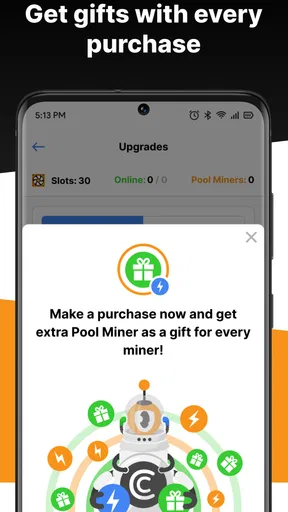
CryptoTab Farm is a free finance app from CT Systems, with in-app purchases ranging from about $2.49 to $998.99 per item. I would check the purchase screen carefully before committing to anything; a free download does not mean every optional purchase is necessary or suitable. It is rated for everyone, and its current version is 1.0.3573, with Android 7.0 or later required. The app was released on June 10, 2021, and has passed one million installs, with an average rating of 3.5 from around 23,000 ratings and about 790 written reviews. That mixed reception is a reminder to decide based on your own devices and expectations, not on popularity alone.
My practical verdict
I would recommend trying it only if you have spare equipment, are comfortable monitoring how that equipment behaves, and see the process as an experiment rather than a reliable income plan. Set a modest speed, check the devices in real use, and do not add hardware or invite others until you understand the trade-offs. For me, the dashboard and remote management make a small farm easier to oversee, but the need to judge device load and running costs remains firmly with the user.
If you want a conventional finance tool, choose one designed for budgeting or investments. If you want a low-commitment way to explore managing a mining setup from a phone, this app has a clear purpose. I’d keep expectations measured, treat displayed earnings as only one part of the decision, and stop if the devices’ heat, power use, or reduced usefulness outweighs the learning experience.
Pros
- Easy setup for beginners.
- Supports multiple devices seamlessly.
- Automated mining process.
- Low power consumption mode.
- User-friendly interface.
Cons
- Limited customer support options.
- Requires constant internet connection.
- Occasional app crashes reported.
- Subscription model may be costly.
- Limited withdrawal methods available.
FAQs for CryptoTab Farm: Digital Gold
What is CryptoTab Farm: Digital Gold?
CryptoTab Farm: Digital Gold is a mobile application designed to help users mine cryptocurrency using their devices. It provides an easy-to-use interface for both beginners and experienced miners. The app allows users to manage their mining operations efficiently while offering insights into earnings and performance.
How does CryptoTab Farm work on mobile devices?
CryptoTab Farm leverages the processing power of your mobile device to mine cryptocurrency. It operates in the background, using a portion of your device's CPU to perform mining tasks. Users can adjust the mining speed to balance performance and energy consumption, making it suitable for various device capabilities.
Is CryptoTab Farm safe to use?
Yes, CryptoTab Farm is designed with user security in mind. It does not require access to personal data beyond what's necessary for mining operations. The app uses secure protocols to protect user information and ensure that all transactions are conducted safely. However, users should always download apps from trusted sources to avoid potential security risks.
What are the potential earnings from using CryptoTab Farm?
Earnings from CryptoTab Farm depend on several factors, including the processing power of your device, the time spent mining, and current cryptocurrency market conditions. While it provides an opportunity to earn digital currency, it's important to manage expectations as earnings can vary and are not guaranteed.
Can CryptoTab Farm affect my device’s performance or battery life?
Using CryptoTab Farm can impact your device's performance and battery life, as mining requires processing power. The app allows you to adjust mining speed to mitigate these effects. Running it at a lower speed can reduce strain on your device, but may also decrease potential earnings. Always monitor your device’s temperature and performance while mining.


